Our 4K Netflix Was 720p Because We Own Our Computer
The stream was 720p all along. The connection was innocent. The fix is a computer that answers to someone else.
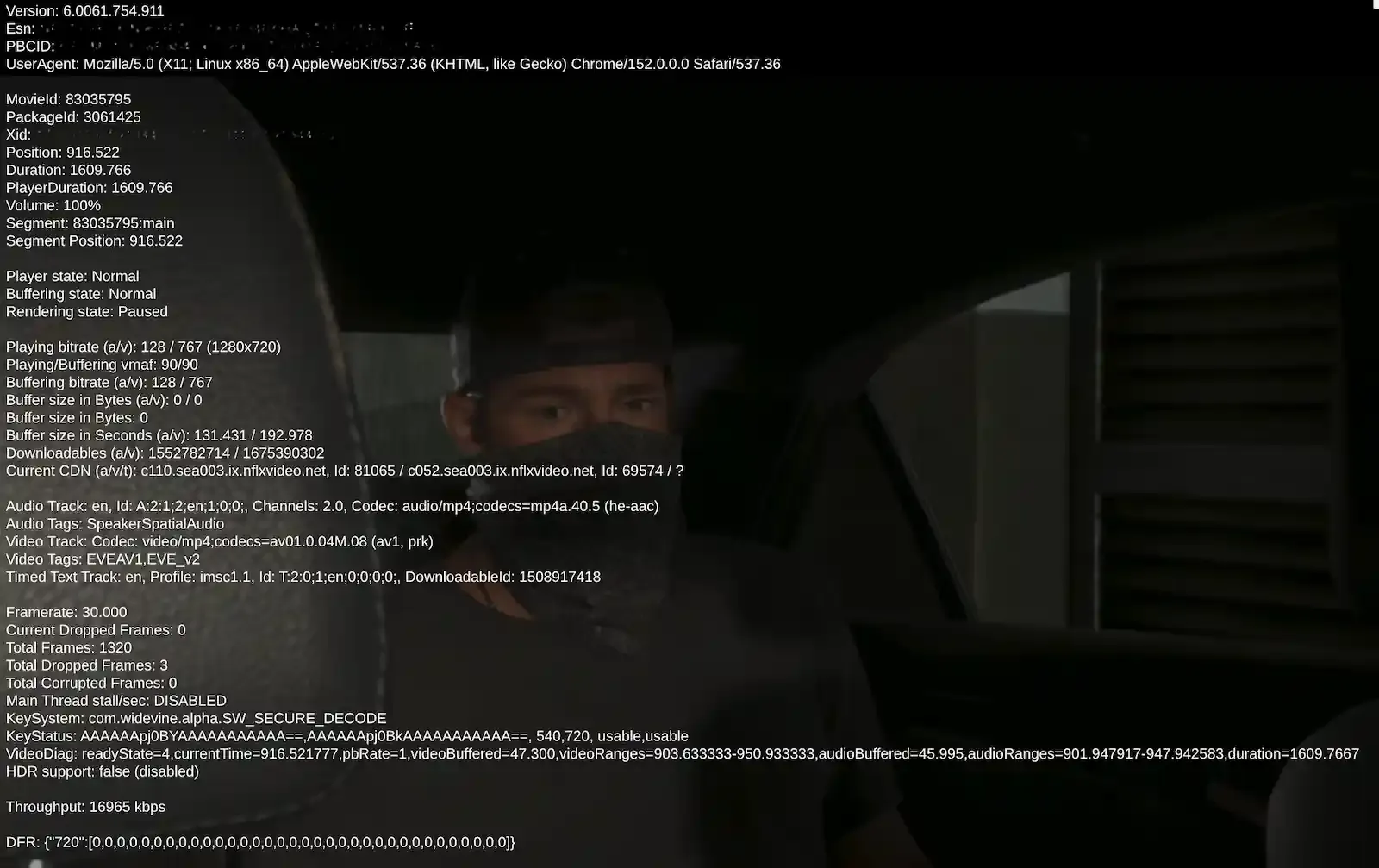
For months, we watched Netflix believing it was 4K. We pay for the Premium plan — the tier with Ultra HD in the name and a price built on it — on a screen bought specifically for the pixels. Then one evening we pressed Ctrl+Alt+Shift+D, a key combination Netflix does not advertise, and a diagnostic overlay appeared over the film like a confession. Near the top, a resolution: 1280 by 720. That is 720p, on the 4K plan. We wanted to know why. We now know, we are sorry we asked, and the answer is worse than a bug. It is a policy, and it is working correctly.
The short version: our computer runs Linux, and Netflix caps Linux browsers at 720p. The obvious explanation — Linux is niche, unsupported, waiting its turn — is wrong, and Netflix’s own documentation is what disproves it. ChromeOS, which is Linux with a security badge and a corporate parent, gets full 4K in the same Chrome browser. What disqualifies our machine is who is in charge of it. We are, and that cannot be patched out, because it is the property we bought the machine for.
What the player admitted
The numbers first. The stream was 720p at 767 kilobits per second, and the overlay’s HDR line read false, with “disabled” appended in brackets, closing the question from both ends.
Further down sat the quality ladder — the list of resolutions a stream may move between as conditions allow. Ours contained one fucking rung: 720p.
The pipe was not the problem. The same overlay measured our connection at just under 17 megabits per second, clear of the 15 Netflix itself publishes (opens in a new tab) as the bar for 4K. The connection qualified. The screen qualified. The account qualified. The machine was the objection.
You have run this investigation yourself, with worse tools. The picture goes soft, you pause it, you run a speed test, the speed test passes, and you restart the router anyway, because the router cannot argue. The router was innocent. The ceiling on your stream was set years ago, in a specification you have never heard of, and the turning off and on again never reaches it.
The line that actually hurt was the score. Netflix grades every stream with VMAF (opens in a new tab), a picture-quality metric it built and won an Emmy for, and ours read 90 out of 100. A well-made 720p stream, at the distance people actually sit from screens, looks good — good enough that we, a publication whose entire trade is noticing things, watched it for months without noticing.
Part of the trick is that Netflix sends its best work to its least trusted customers. The overlay showed our stream used AV1, a thoroughly modern format, tuned well enough that the one rung we were allowed had been polished to a shine. The picture was good. The number was wrong. It has taken us months to be able to say those two sentences in that order.
Before you write in to say you would have caught it in an afternoon: possibly. The keys are Ctrl+Alt+Shift+D. Go and read what your own laptop is being served — we hope, sincerely, that it is better news than ours:
The rules, as published
Netflix, to its credit, publishes the ceilings (opens in a new tab). On desktop Linux, Chrome, Firefox and Edge top out at 720p; Opera, alone, gets 1080p, for reasons the table does not give and we could not establish. On Windows 11, Chrome and Edge reach 4K — Chrome only since early August (opens in a new tab), and only with a recent enough processor and a monitor that can pass a copy-protection handshake called HDCP 2.2. On a Mac, Safari does 4K, Chrome does 1080p, and Edge — 4K-capable one operating system to the left — does 720p. Same programs, same companies, reshuffled at every border crossing.
That August update also disposes of the obvious hope, which is that the table simply has not gotten to Linux yet. When Netflix extended 4K to Chrome, it went to Windows 11 and to Chromebooks, and the coverage recorded the rest plainly: macOS and Linux do not support 4K playback at this time. The queue moved. We were not in it.
Underneath the table is Widevine, Google’s digital rights management system — the software that decides, on a copyright holder’s behalf, what your own equipment is allowed to show you. It operates in two arrangements that matter here. In the trusted one, the film is unscrambled inside a sealed compartment of the hardware that nothing else on the machine — the operating system included, the owner included — can look into. In the other, everything happens out in the open, in ordinary software, which is the arrangement our overlay named: software decode, it said, right there in the name. Desktop Linux browsers get the open arrangement unconditionally; there is no way for your hardware, however capable, to volunteer. The grade does not measure what your machine can do. It measures how reliably your machine can keep a secret from you.
The Chromebook next door
Netflix’s Chromebook page (opens in a new tab) offers Ultra HD in Chrome on a Chromebook Plus. ChromeOS is built on the same core as our operating system and runs the same browser we were sitting in front of. What a Chromebook has that our tower does not is verified boot (opens in a new tab): a chain of vouching that begins in a chip the owner cannot rewrite, where each layer of the machine certifies the next before letting it run, so that “all executed code comes from the ChromeOS source tree.” Whether a change came from malware or from the person who paid for the machine is not a distinction the system draws.
A computer you can modify is outside that guarantee by definition. No driver update mends this, no future release, no year of the Linux desktop. The 720p cap is a verdict on a property, and the property is ownership.
If you suspect capability is somewhere in the question, the same Chromebook settles it twice. The Netflix app from the Play Store, installed on that same certified machine, is capped at 720p; the browser beside it streams 4K. One machine, one company’s operating system, one subscription, two outcomes. The certificate does not describe the hardware. It describes which arrangement of the hardware has been through the paperwork.
Not a Netflix story
The neighbors run the same wall, mostly taller. Amazon’s system requirements (opens in a new tab) restrict every operating system that is not Windows or macOS to standard definition — 480p, a number that last described a good picture when televisions had backs. Disney+ (opens in a new tab) declines to serve 4K to any browser on any operating system at all. Netflix is distinct only in publishing the ceilings in a table and shipping an overlay that states your standing to your face, which is why it is the case study of this piece: the best witness, not the worst offender.
The authors sit upstream. In 2013, MovieLabs — the research venture the major studios own jointly — published its Specification for Enhanced Content Protection (opens in a new tab), the security baseline for distributing film in 4K. It requires a hardware root of trust, “securely provisioned, e.g., permanently factory burned”; a secure zone “isolated by hardware mechanisms running only authenticated code”; and it closes the loop on entry: cryptographic keys “shall not be issued until that implementation has been certified.”
Each studio, the document notes, decides individually which of these practices are prerequisites for carrying its content. Netflix and Google operate the wall rather than drafting it — with the footnote that Netflix makes its own films now, and so sits on both sides of the table, an arrangement it appears to find comfortable.
The part where they have a point
The premise deserves its due. A hardware root of trust genuinely cannot be established on a machine whose owner can rewrite its deepest software; that is not spite, that is what hardware-enforced means. If the owner can rebuild the chain of vouching, the vault has a door and the owner is holding the handle. Our tower did not fail to be a sealed appliance. It was built, deliberately and at some expense, not to be one, by us.
What the seal actually buys is the softer question, and the studios have answered it themselves. The same specification opens by conceding that pristine pirated copies are often available the day a title releases, and that release-day rips are “the most challenging to prevent because it only takes a single skilled adversary with a single compromised platform to post a single copy to a file-sharing network.” The platforms available for compromising are the certified ones — that is where the keys live. An uncertified machine is never trusted with anything worth stealing.
The document even contains a section titled “Hack One, Only Hack One,” which is the heading of an institution negotiating the leak’s terms, not one expecting to stop it. The picture gets out on schedule. The wall holds back a different group: people who build their own equipment, subscribe anyway, and stream 720p beside a shelf of home servers that could run a small broadcaster.
No fee, no form, no path
So we went looking for the door, wallet already resigned. There is no charge: Google licenses Widevine royalty-free (opens in a new tab), to about a thousand partners, at eighty-two billion licences a quarter. But free is not open. Access is a commercial relationship between Google, the studios and hardware manufacturers, entered at the scale of a factory and sealed by that certification requirement. The public-facing site offers a contact page, a support troubleshooter, and a training course for professionals who install Widevine for their clients — a way in for your employer, and not for you.
Everything else in self-hosting eventually yields to money, patience, or a level of stubbornness adjacent to a diagnosis. This wall has no price on it, because nothing behind it is for sale. The upgrade path from a computer you own is a computer you don’t.
Receipts
- Netflix’s supported browsers and resolution table (opens in a new tab)
- Netflix’s Ultra HD requirements on Windows (opens in a new tab)
- Netflix on Chromebook — the app and browser ceilings (opens in a new tab)
- MovieLabs, Specification for Enhanced Content Protection v1.0, 2013 (opens in a new tab)
- ChromiumOS design documents — verified boot (opens in a new tab)
- Widevine — licensing and partners (opens in a new tab)
- Prime Video system requirements for computers (opens in a new tab)
- VMAF, Netflix’s perceptual quality metric (opens in a new tab)